
Open2b version 7.8
Notifications
Often you need to run automated procedures when specific events occur, such as the creation of an order or an inventory update. For this reason apps can receive notifications from Open2b when the events they care about occur. For apps published on the Store you can indicate which events you want to receive notifications for when you publish the app. For external apps, i.e. those not published on the Store, you can do this directly in the store back office under "Apps > Edit" by clicking the row for the app:
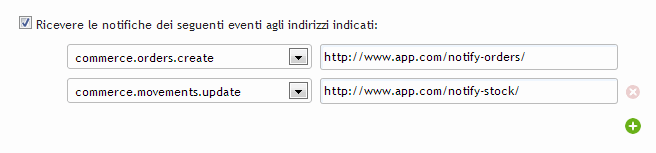
In the first column you select the topic (event name) and in the second column you specify the address that will be called when the event occurs. The address can be either "http" or "https". In addition, in the address it is always a good idea to include a parameter that only you know, which will allow you to verify that the notification is authentic:
- https://www.mylistener.com/on-order/?mysecret
- https://user:pass@www.otherlistener.com:1893/listener.php
IP numbers or local addresses are not allowed, nor protocols other than "http" and "https":
- http://localhost/on-order/?mysecret
- https://74.125.232.152:1893/listener.php
- ftp://ftp.mysite.com/
Events are notified to the app on average every 2 minutes and each notification concerns one or more events of the same topic and the same store. The notification is sent to the specified address through an HTTP POST call with a JSON object in the message body:
{
    "shop" : "AY7M1ZGPEN",
    "topic" : "commerce.orders.create",
    "elements" : [ 1771949227, 2035931847, … ]
}| shop | store identifier |
|---|---|
| topic | event name |
| elements | items on which the event occurred |
The list of items on which the event occurred is not in chronological order but random and does not contain duplicate items even if the event occurred more than once for the same item. Once the notification is received, the app must respond with status 200 OK.
Due to potential network issues, you should not rely strictly on notification delivery times and be ready for delays. If your app does not respond to notifications as expected, Open2b will keep sending them for two days. Events older than two days will no longer be notified.